


If you wear compatible Phonak hearing aids, myPhonak is the kind of app that can quietly become part of your daily routine rather than something you open once and forget. I tried to look at it as a practical medical companion, not simply as a remote control. Its main appeal is the way it brings hearing adjustments and personal tracking into one place, but that combination also means its value depends heavily on your hearing-aid setup and on how much control you actually want.
Developed by Sonova AG, the free app sits in the medical category and is suitable for everyone. It has been available since April 16, 2018, and the current release is version 7.5.1 for devices running operating system 10 or later. With an average rating of 4.5 from around 130 thousand ratings and more than a million installs, it is clearly an established companion for Phonak users rather than an experimental side project.
How I would decide whether myPhonak is right for me
The first question is not whether the interface looks useful. It is whether you use hearing aids that can work with it. This is a companion app built around the Phonak ecosystem, so people looking for a brand-neutral hearing tool should begin elsewhere. If your hearing aids are compatible, the decision comes down to three things: how often you need to adjust your listening experience, whether health tracking matters to you, and whether you prefer making small changes yourself instead of returning to a hearing professional for every adjustment.
I would also consider how comfortable you are with a phone-based workflow. The app can make everyday control more convenient, but it does not replace the hearing aids, a hearing assessment, or professional fitting. Someone who expects an app to correct every hearing difficulty independently may be disappointed. Someone who wants a convenient layer between their hearing aids and daily activities is much more likely to appreciate it.
For me, the strongest reason to use it is context. Hearing needs can change between a quiet kitchen, a busy restaurant, a television in the evening, and a walk outdoors. A fixed setting that feels fine in one place may be less comfortable in another. Having the app available gives me a way to respond to those changes without treating every situation as a technical problem that requires an appointment.
What the everyday experience feels like
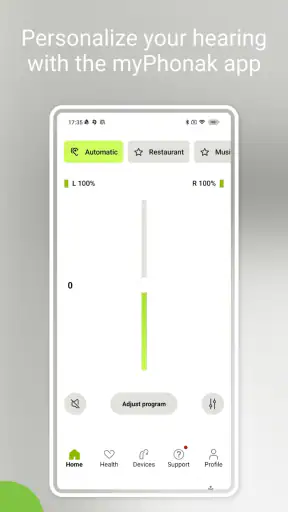
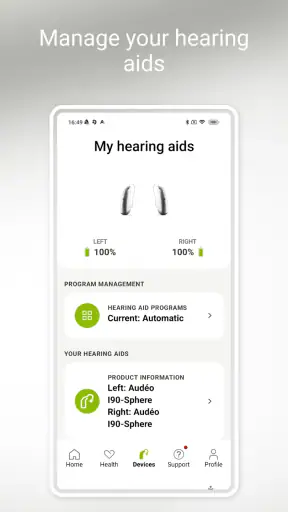
The app is most useful when I think of it as a control panel for a wider hearing routine. Instead of reaching for the hearing aids repeatedly, I can use the phone as the place where adjustments and related information come together. That is a small difference, but it matters when the phone is already in my hand or when the hearing aids are difficult to manipulate directly.
A realistic example is a family meal. At home, a normal listening setting may be comfortable, but several people speaking from different sides of the table can make the experience tiring. I would use the app before the meal to check my listening setup, then make a modest adjustment if the room became more demanding. The important point is not that the app magically separates every voice. Its value is giving me a practical way to respond instead of simply putting up with an uncomfortable setting.
In a different situation, I might use it before watching television. Rather than treating television volume as the only solution, I can approach the hearing experience more deliberately. That can be helpful for the person wearing the aids and for everyone else in the room, since turning up the television is not always the most considerate answer.
Personalized control is the main reason to install it
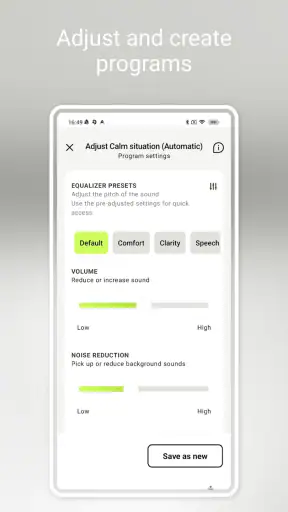
The personalization angle is more meaningful than a collection of generic sound controls. Hearing is personal, and the setting that feels natural to one user may be distracting or tiring to another. The app is designed to make that personal relationship easier to manage, especially for users who are still learning which adjustments help in familiar environments.
My advice is to make one change at a time and pay attention to the result. If I alter several things at once, I cannot tell which change helped. A better workflow is to note the setting that feels difficult, make a small adjustment, and use it in the same situation again later. This turns the app into a learning tool: over time, I become better at recognizing what I need instead of experimenting randomly whenever sound feels wrong.
That approach also helps prevent over-adjustment. It is tempting to keep changing settings because the first result is not perfect. In practice, a modest change may be more comfortable than a dramatic one. If a problem keeps returning, that is a reason to discuss it with a hearing professional rather than endlessly compensating through the phone.
Health data adds a different layer
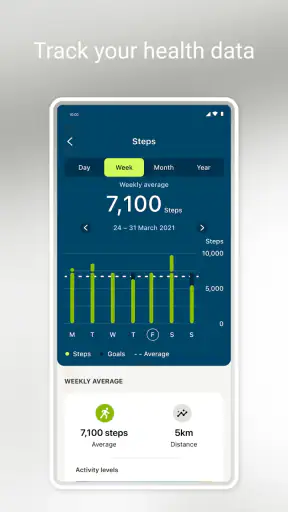
The health-data side gives myPhonak a broader purpose than a conventional hearing-aid remote. It encourages me to think about hearing as part of my routine and wellbeing, not just as a device that is either on or off. Tracking can be useful when I want to notice patterns: perhaps I use the aids consistently on workdays but remove them early on social evenings, or perhaps certain environments leave me more tired than I realized.
The practical benefit is reflection, not diagnosis. I would use the information to prepare better questions for a professional or to understand my own habits. I would not treat an app record as medical advice, and I would not change treatment based on a number alone. This distinction is important because health tracking can feel authoritative even when it is mainly a record of personal use and behavior.
A useful habit is reviewing the information at a calm time rather than checking it constantly. Looking for a pattern once in a while is more valuable than turning the app into another source of daily pressure. If tracking motivates me to wear my hearing aids more consistently or notice a recurring difficulty, it has earned its place. If it makes me anxious without leading to a useful action, I would reduce how much attention I give it.
Small workflows that make the app more useful
One non-obvious advantage is that the app can help me separate two problems that are often confused: an uncomfortable listening environment and a hearing-aid setting that needs professional attention. If a minor adjustment solves a one-off situation, I can move on. If the same issue appears in several places, I have a clearer reason to seek help. That saves me from assuming every difficult conversation is caused by the same thing.
Another useful workflow is preparing before a predictable challenge. I would not wait until I am already seated in a noisy restaurant to explore the controls for the first time. Trying the app at home lets me learn where the relevant options are and what a comfortable change feels like. The goal is confidence, not constant tinkering.
I also see value in using the app as a communication aid with family members. If someone asks why I am changing a setting or why the television is at a certain volume, I can explain that I am trying to improve comfort rather than simply asking everyone else to speak louder. That does not solve communication by itself, but it can make the adjustment process less mysterious for the people around me.
Where myPhonak wins over simpler alternatives
Compared with using only the physical controls on hearing aids, myPhonak offers a more visible and approachable way to manage the experience. A phone screen can be easier to understand than tiny buttons, especially for someone who does not enjoy memorizing what each press does. It also gives the routine a clearer structure: adjustment and personal information live together instead of being scattered between the hearing aids and separate notes.
Compared with relying only on a hearing clinic, the app is more convenient for small day-to-day changes. A professional fitting remains important, but not every uncomfortable moment deserves an appointment. The app gives me a middle option between doing nothing and asking for a full review.
Its strongest advantage over a generic health tracker is context. A general wellness app may record broad habits, but myPhonak is connected to the experience of using Phonak hearing aids. That makes the information more relevant to a wearer deciding how consistently the aids fit into daily life.
The app is also free, which lowers the cost of trying it. That does not make the overall hearing-aid ecosystem inexpensive, since the app is only one part of the setup, but there is no separate app price standing between a compatible user and the basic experience.
Where another option may fit better
The clearest alternative is not necessarily another app. It may be a professional appointment, especially when the problem is persistent, sudden, painful, or present across many settings. An app can help me manage a known situation, but it should not become an excuse to postpone proper care.
A different hearing-aid brand’s companion app may be the better choice for someone who has not yet selected a device. In that case, the decision should begin with hearing needs, fitting quality, comfort, support, and compatibility rather than with the appearance of one phone application. Choosing a hearing aid solely because its app looks attractive would put the priorities in the wrong order.
Some users may also prefer a simpler routine. If I rarely adjust my hearing aids, do not care about tracking, and am happy with professional settings, a companion app may feel unnecessary. The phone adds another step, another interface to learn, and another thing to keep updated. Convenience for one person can be friction for another.
People who want a general hearing test, diagnosis, or treatment plan should not treat myPhonak as the answer. Its role is supporting the use of compatible hearing aids and helping the wearer understand daily management. That is narrower than a complete medical service, and recognizing that boundary makes the app easier to judge fairly.
The real cost of switching to an app-based routine
Installing a free app is easy; changing habits is not. The first cost is attention. I need to remember that the app exists, learn its controls, and decide when an adjustment is worthwhile. If I already feel overwhelmed by hearing technology, adding a phone workflow may initially make things feel more complicated.
There is also a transfer cost when moving from familiar physical controls. A person who has developed muscle memory for the hearing aids may not immediately feel faster with a screen. I would keep the physical controls available while learning the app rather than trying to replace every existing habit on the first day.
The best way to switch is gradually. I would install it, explore it in a quiet room, and then use one feature during a predictable activity. After that, I would decide whether the adjustment actually saved effort. This avoids the common mistake of spending more time managing the tool than benefiting from it.
Tracking creates its own trade-off. It can reveal useful patterns, but it can also encourage over-monitoring. I would decide in advance what I want to learn from the information. For example, I might use it to notice consistency over a period of normal life, then stop checking once I have a clear question to discuss. That keeps the health side practical rather than obsessive.
Who will get the most from it
I would recommend myPhonak most strongly to a Phonak hearing-aid wearer who wants more control in changing environments. It makes particular sense for someone who attends social gatherings, watches television with others, moves between quiet and noisy spaces, or is trying to build a more consistent hearing routine.
It may also suit a family member helping an older adult become comfortable with hearing aids. Learning together can reduce frustration, especially when the wearer finds small device controls difficult. The helper should still support the wearer’s independence rather than taking over every adjustment. The app works best when it helps the person understand their own preferences.
I would be more cautious recommending it to someone who expects a diagnostic tool, has incompatible hearing aids, or dislikes tracking. I would also hesitate if the person’s main complaint is that the hearing aids never feel right. In that situation, professional fitting deserves priority; an app should support a good setup, not conceal a poor one.
Compatibility, upkeep, and expectations
The current version is 7.5.1 and requires operating system 10 or later, so I would check the phone before planning a setup. Compatibility with the hearing aids is equally important. A user can meet the phone requirement and still find that the exact hearing-aid model or configuration determines what is available in practice.
I would also approach updates sensibly. Keeping the app current can be useful, but I would avoid updating immediately before an important trip or event if I have not tested the routine afterward. Hearing support is personal, and a few minutes of checking can prevent an unpleasant surprise when I most need reliable access.
The age rating of Everyone makes the app broadly approachable, but that should not be confused with medical simplicity. A child, older adult, or caregiver may still need help understanding what an adjustment does. Clear explanations and patient experimentation matter more than the age label alone.
My recommendation after weighing the trade-offs
MyPhonak is a worthwhile free companion for people already using compatible Phonak hearing aids, especially when they want personalized control and a clearer view of their hearing-related habits. I like that it addresses both immediate comfort and longer-term awareness. The app is most convincing when it helps me handle ordinary moments—conversation, television, meals, and changing surroundings—without pretending to replace professional care.
I would not install it simply because every hearing-aid wearer must have an app. If my current setup works well, I never adjust it, and tracking has no appeal, the benefit may be limited. Likewise, if I need diagnosis or a major correction, I would choose a hearing professional before spending time fine-tuning a phone screen.
My clear advice is to try it as a supporting tool, not as the center of your hearing care. Start in a quiet environment, learn one adjustment, use it in a familiar real-world situation, and review whether it genuinely makes life easier. If it does, the app can become a useful bridge between professional fitting and everyday listening. If it does not, that result is useful too: it may show that your needs are better served by simpler controls, a different hearing-aid ecosystem, or a conversation with your provider.
Overall, I see myPhonak as a practical extension of compatible Phonak hearing aids rather than a standalone medical solution. Its value comes from the connection between personalized hearing management and health awareness. For the right user, that connection can make hearing technology feel less passive and more manageable; for everyone else, the app is unlikely to overcome a mismatch in devices, expectations, or care needs.


